
Whenever we connect a phone, computer, smart TV, or another device to the internet, that connection needs an identifying address. This is where an IP address comes in. If you’ve ever searched for “my IP address,” you were probably trying to find out what address your internet connection is using.
An IP address is more than just a string of numbers. It helps networks identify where data should be delivered and allows devices to communicate across the internet. At the same time, understanding what an IP address reveals—and what it does not reveal—can help you make smarter decisions about online privacy and security.
Let’s look at how IP addresses work, how to find yours, and why the result may change.
What Is an IP Address?
An Internet Protocol (IP) address is a numerical identifier assigned to a device or network interface that communicates over an IP-based network.
Think of it somewhat like a mailing address. When someone sends a package, the postal system needs an address to determine where it should go. Similarly, internet traffic uses IP addresses to identify destinations and route information between networks.
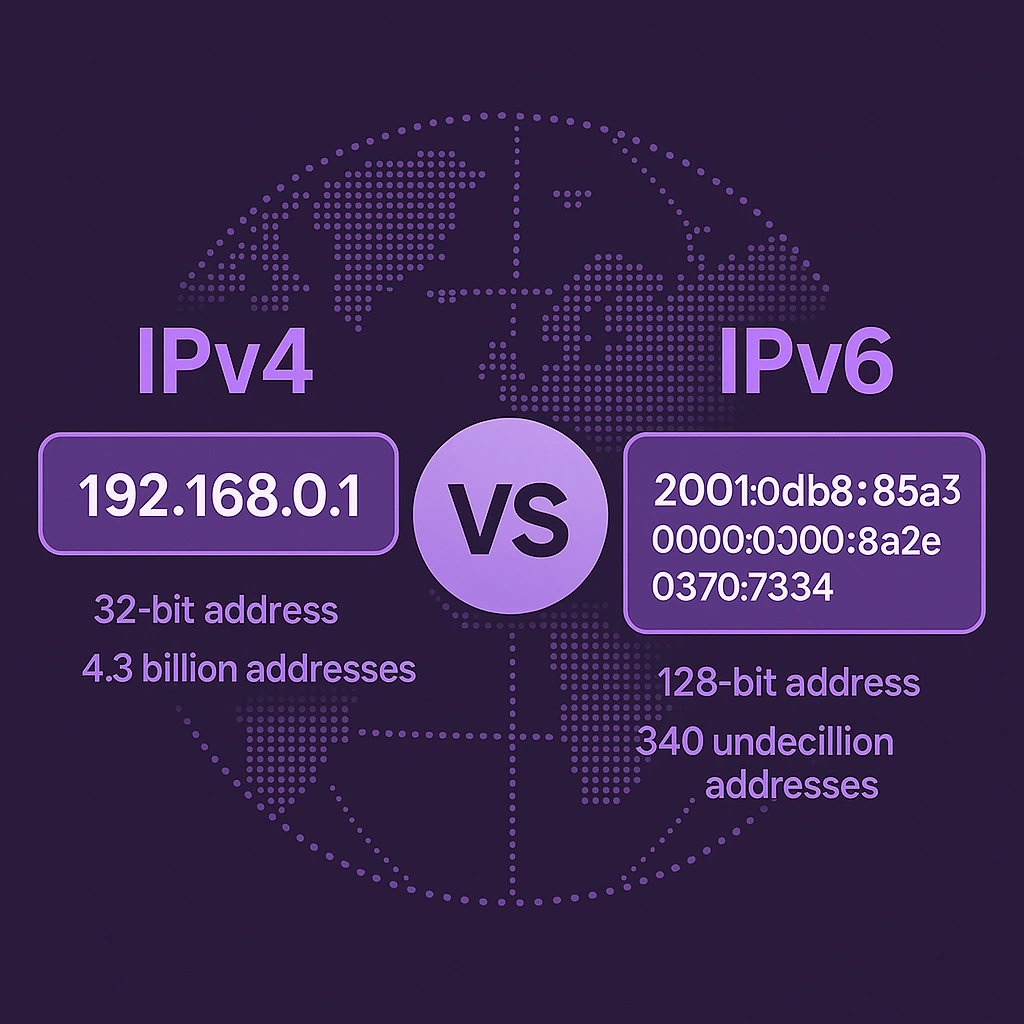
There are two main versions in everyday use:
- IPv4: Uses addresses such as
192.168.1.10. - IPv6: Uses a much larger address space, such as
2001:db8::1.
Your internet connection may use either version or both, depending on your network and service provider.
How Can I Find My IP Address?
Finding your current address is usually very simple. You can search online for “what is my IP” or “my IP address”, and many websites will display the public address associated with your connection.
You can also check it through your operating system or router settings.
The important detail is that there are actually different types of IP addresses, so the address shown by an online checker may not be the same one you see inside your device’s network settings.
Public IP vs. Private IP
This distinction causes a lot of confusion.
Your public IP address is generally associated with your internet connection and is visible to websites and online services. Your private IP address is used within your local network.
For example, a home router might have a public address assigned by an internet service provider while giving individual devices private addresses such as 192.168.1.5 or 10.0.0.8.
| Feature | Public IP | Private IP |
|---|---|---|
| Main purpose | Internet communication | Local network communication |
| Usually assigned by | ISP or upstream network | Router/network administrator |
| Visible to websites | Generally yes | Generally no |
| Common examples | ISP-assigned IPv4/IPv6 | 192.168.x.x, 10.x.x.x |
| Can be reused elsewhere | Generally unique within routing scope | Yes, across separate private networks |
Knowing this difference immediately makes IP-related troubleshooting much easier.
Why Does My IP Address Change?
Seeing a different address from one day to another doesn’t necessarily indicate a problem.
Many residential internet connections use dynamic IP addresses. Your ISP may assign an address temporarily and change it later. Restarting networking equipment, reconnecting to the service, or changes on the provider’s network can sometimes result in a different public address.
Some customers, particularly businesses, purchase static IP addresses that are designed to remain consistent.
Mobile networks can behave differently as well. Your phone may receive an address from a carrier’s network, and that address can change as you move between connections or reconnect to the cellular network.
What Information Does an IP Address Reveal?
An IP address can provide useful information about your network connection, but it isn’t a precise digital map to your home.
IP geolocation services can often estimate:
- Country
- Region or state
- General city or nearby area
- Internet service provider
- Autonomous system or network information
However, the result can be inaccurate. An address may appear to be associated with another city, a provider’s headquarters, or a data center.
An IP address by itself generally does not provide someone’s exact home address, name, or phone number.
That distinction is important because online IP lookup results are often presented with more certainty than the underlying data deserves.
IP Addresses in Real-World Network Management
Imagine you’re working from home and suddenly a company website refuses to load. You check your public IP and discover that it has changed since yesterday.
That change could matter if the company’s security system uses IP allowlisting. If your previous address was approved but the new one isn’t, access may be blocked even though your computer, username, and password haven’t changed.
In this situation, checking the current network address can quickly point toward the real cause instead of wasting time reinstalling software or changing unrelated settings.
Can an IP Address Identify You?
This depends on what information is available to the organization observing it.
An IP address can be associated with an internet service provider and a particular connection at a particular time. ISPs may maintain records that can connect assigned addresses with customer accounts, subject to applicable laws and policies.
Websites can also record visitors’ IP addresses for purposes such as security, analytics, fraud prevention, and abuse detection.
Still, an IP address isn’t the same thing as a person’s identity. Multiple people can share one public address, especially when a router or carrier network uses Network Address Translation (NAT).
What Is IPv4?
IPv4 is the older and still extremely common version of Internet Protocol addressing.
It uses 32-bit addresses, allowing approximately 4.3 billion possible address combinations. That sounded enormous decades ago, but the explosive growth of internet-connected devices made IPv4 addresses increasingly scarce.
Private addressing, NAT, and other techniques have helped extend IPv4’s usefulness.
A typical IPv4 address looks like:
203.0.113.25
It contains four numerical sections separated by periods.
What Is IPv6?
IPv6 was developed largely to solve the limitations of IPv4 address availability.
It uses 128-bit addresses, creating an enormous address space. An IPv6 address can look intimidating at first:
2001:db8:85a3::8a2e:370:7334
The format uses hexadecimal characters and colons rather than the familiar four-part IPv4 structure.
IPv6 also introduces improvements in addressing, routing, and network configuration. Adoption varies by country, ISP, network, and device, so many modern connections support both IPv4 and IPv6.
Is It Safe to Share Your IP Address?
An IP address isn’t usually considered secret information in the same way as a password. Websites you visit can normally see an address associated with your connection anyway.
However, that doesn’t mean you should publish it unnecessarily.
Avoid combining your IP address with sensitive personal information on public forums. If you’re troubleshooting with a technician, share only what is necessary and use trusted communication channels.
Most importantly, never treat your IP address as a password or security credential.
Does a VPN Change My IP Address?
A VPN (Virtual Private Network) can make websites see the VPN server’s public IP address instead of the public address directly associated with your normal internet connection.
For example, if your regular connection appears to originate from one location and you connect through a VPN server elsewhere, websites may see the server’s address.
A VPN can therefore improve privacy in certain situations, but it doesn’t make someone completely anonymous. Your VPN provider, browser configuration, accounts, cookies, device characteristics, and other factors can still contribute to identification.
Why Checking Your IP Can Be Useful
Checking your current network address isn’t something most people need to do every morning. Yet it can be surprisingly useful when troubleshooting.
It can help when:
- A service has restricted access by IP
- You’re configuring remote access
- A business requires IP allowlisting
- You’re investigating unexpected network behavior
- You’re testing a VPN
- You want to confirm whether your connection appears to originate from a different network
The key is to treat the address as one diagnostic clue, not the entire explanation.
How to Protect Your Online Privacy
You don’t need to become a networking expert to improve your privacy.
Start with practical habits:
- Use strong, unique passwords.
- Enable multi-factor authentication where available.
- Keep your operating system and browser updated.
- Secure your home Wi-Fi with modern encryption.
- Be cautious when using public networks.
- Review app and browser permissions.
- Use a reputable VPN when it fits your needs.
- Avoid sharing unnecessary network information publicly.
Privacy is rarely about one magic setting. It comes from several sensible layers working together.
Also Read: 45.248.163.181: IP Address, Location & Network Overview
Conclusion
Your IP address is a fundamental part of how internet communication works. It helps networks route traffic, allows services to recognize connections, and provides useful information for troubleshooting.
The most important distinction to remember is between public and private addresses. The public address is generally what online IP-checking services display, while private addresses operate within your local network.
If your address changes, that isn’t automatically suspicious. Dynamic addressing is normal for many connections. Likewise, an IP address can provide clues about a connection without automatically revealing someone’s exact physical location or identity.
Once you understand these basics, checking your current address becomes more useful—and far less mysterious.
FAQs
What is my IP address used for?
It is used to identify and route network traffic to and from your connection. Websites and online services can generally see a public IP associated with your connection.
How do I check my current IP?
You can use an online IP-checking service or inspect your device’s network settings. Remember that online tools typically show your public address, not your device’s private LAN address.
Can my IP address reveal my exact location?
Usually, no. IP geolocation can estimate a general area, but it may be inaccurate and normally shouldn’t be treated as an exact street-level location.
Why does my IP address keep changing?
Your ISP may assign a dynamic address. Changes can happen after reconnecting, network maintenance, lease expiration, or other provider-side events.
What is the difference between IPv4 and IPv6?
IPv4 uses 32-bit addresses, while IPv6 uses 128-bit addresses. IPv6 provides a vastly larger pool of addresses and is increasingly supported by modern networks.
Does restarting my router change my IP?
It can, but there is no guarantee. Whether the public address changes depends on how your ISP manages dynamic address assignments.
Can two devices have the same IP address?
Two devices can share the same public IP when they are behind the same router or NAT system. Inside that network, each device normally receives its own private IP.
Does a VPN hide my real IP?
A VPN generally makes websites see the VPN server’s public IP rather than your normal public IP. However, it does not guarantee complete anonymity.

One thought on “My IP Address: How to Find and Understand It Easily”