
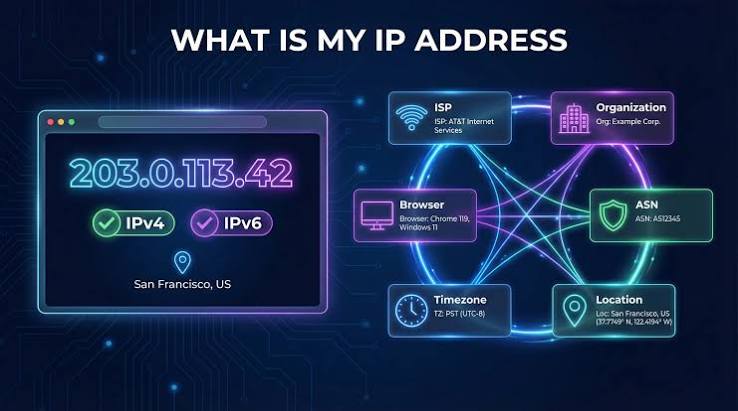
When you search for “my IP,” you are usually trying to answer a simple question: What IP address is my device using right now? It sounds technical, but the concept is easier to understand than it first appears.
An IP address is essentially a digital identifier used to help devices communicate across a network. Whether you are browsing a website, streaming a video, checking email, or connecting to an online service, your internet connection relies on IP addressing behind the scenes.
However, there is more to your address than a string of numbers. Understanding the difference between a public and private IP, how your address can change, and what websites can learn from it can make everyday internet use much easier to understand.
What Is an IP Address?
An IP address, short for Internet Protocol address, is a numerical identifier assigned to a device or network interface so that network traffic can be delivered to the right destination.
Think of it like a mailing address for digital communication. When you request information from a website, the network needs a way to know where the response should go.
There are two major versions:
- IPv4: Uses four numerical sections, such as
192.0.2.1. - IPv6: Uses a much longer hexadecimal format, designed to provide a vastly larger pool of addresses.
When people search for their IP, they are most often looking for their public IP address, which is the address visible to services on the internet.
What Is My Public IP?
Your public IP is the address associated with your internet connection as seen from outside your local network.
Your internet service provider (ISP) generally assigns it to your connection. Depending on your provider and service plan, it may remain the same for a long period or change periodically.
For example, if you connect your laptop to your home Wi-Fi and visit an IP-checking website, the address displayed will generally be your public-facing IP rather than the private address assigned to the laptop itself.
This distinction matters because your phone, laptop, smart TV, and other devices can have different private addresses while sharing the same public IP when they access the internet through one router.
Public IP vs. Private IP
The easiest way to understand IP addressing is to separate the public side from the private side.
| Feature | Public IP | Private IP |
|---|---|---|
| Used for | Internet communication | Local network communication |
| Usually assigned by | ISP | Router/network administrator |
| Visible to websites | Generally yes | Generally no |
| Example format | ISP-assigned address | 192.168.x.x or similar |
| Can be shared | Often shared by multiple devices behind a router | Usually unique within the local network |
A private IP helps your devices communicate inside your home, office, or other local network. Your public address, meanwhile, represents your connection to the wider internet.
How Can I Find My IP?
Finding your public address is usually straightforward. You can search for an IP-checking service or use a device’s network settings.
On many computers and smartphones, network settings show the local IP address assigned to the device. Online IP-checking tools, by contrast, typically display the public address that websites can see.
The result may also include additional information, such as:
- Approximate geographic location
- Internet service provider
- IP version
- Network or organization
- Connection-related details
The exact information varies by service and database.
Why Does My IP Address Matter?
Your IP address plays a practical role in everyday internet communication.
Websites and online services can use it to help deliver content to your connection. It may also contribute to security systems, fraud detection, traffic analysis, and regional content decisions.
For example, a streaming platform may use your approximate network location to determine which content library or service availability applies to you.
An IP address can also be useful when troubleshooting connectivity problems. If a network administrator knows which address your connection is using, they can investigate routing, access restrictions, or other network-related issues more effectively.
From a practical troubleshooting perspective, one of the most useful lessons is that an IP address identifies a network connection, but it does not automatically identify a specific person with perfect accuracy.
Can an IP Address Reveal My Exact Location?
Usually, no.
An IP lookup may estimate a general location based on information maintained by IP geolocation databases. Depending on the address and database quality, this could indicate a country, region, city, or approximate area.
However, IP geolocation should not be confused with GPS.
An IP address generally cannot tell a website your exact street address simply because you visited it. Accuracy varies considerably, particularly for mobile networks, corporate connections, VPNs, proxies, and shared infrastructure.
This is why two different IP lookup services can sometimes display different city-level results for the same address.
Why Does My IP Keep Changing?
If you notice that your public IP is different from time to time, that is not necessarily a problem.
Many residential internet connections use dynamic IP addresses. Your ISP can assign a different address after reconnecting your router, renewing a network lease, changing network infrastructure, or for other operational reasons.
Some businesses and advanced users purchase static IP addresses, which are intended to remain consistent.
Dynamic addressing is common because it allows providers to manage their available address space efficiently.
My IP and VPNs: What Changes?
A VPN can change the public-facing IP address that websites see.
Instead of connecting directly from your normal internet connection to an online service, your traffic is routed through a VPN server. The destination website generally sees the VPN server’s IP rather than the original public address.
That can be useful for privacy, remote access, or connecting to a particular network location. However, a VPN does not make someone completely anonymous. Other technologies, account information, browser characteristics, cookies, and tracking mechanisms can still provide identifying signals.
A VPN should therefore be viewed as one privacy and networking tool, not an invisibility switch.
A Practical Example of IP Addressing
Imagine you are working from home with a laptop, smartphone, and smart TV connected to the same Wi-Fi router.
Your router may have one public IP assigned by your ISP. Internally, however, each device can receive its own private IP address.
When your laptop opens a website, the router manages the communication between your local device and the internet. The website generally sees the public-facing connection rather than the laptop’s private address.
This setup explains why several devices in the same household can appear to come from the same public IP.
Is It Safe to Share My IP Address?
An IP address is not normally considered secret information in the same way as a password, authentication code, or credit card number. Websites you visit can generally see the public address associated with your connection.
Still, there is little reason to publish your IP unnecessarily.
Avoid combining your IP address with sensitive personal information on public forums or websites. If you receive suspicious messages claiming that someone has your IP and can automatically access your computer, remember that knowing an IP address alone does not normally provide access to your device.
Security depends on many other factors, including firewalls, router configuration, exposed services, software vulnerabilities, and account protection.
What Can You Learn From an IP Lookup?
An IP lookup can be useful for basic network investigation. Depending on the database, it may provide information such as:
- IP version
- ISP or network provider
- Autonomous System information
- Approximate location
- Organization associated with the network
- Hostname, where available
But lookup databases are not infallible. Information can become outdated, and the registered network location may differ from the physical location of the person using it.
For that reason, treat IP lookup information as an approximation rather than definitive proof of someone’s identity or location.
When Should You Check Your IP?
Checking your IP can be useful in several situations.
You might check it when troubleshooting internet connectivity, configuring remote access, verifying a VPN connection, setting up certain business services, or investigating why a website is displaying unexpected regional content.
It can also help you understand whether a VPN or proxy is actually changing your public-facing address.
The key is to know what you are checking. If you need the address visible to websites, look for your public IP. If you are configuring a device on your home network, you may instead need its private IP.
Understanding Your IP Without the Technical Jargon
The simplest way to think about IP addresses is this: your private IP helps identify your device inside a local network, while your public IP represents your connection to the internet.
Neither one tells the entire story of who you are.
Once you understand that distinction, many confusing networking topics become much clearer. VPNs, routers, dynamic addressing, IP geolocation, and even basic connectivity troubleshooting all become easier to understand.
Also Read: My IP Address: How to Find and Understand It Easily
Conclusion
Knowing my IP is more than simply finding a number on a screen. Your IP address is part of the infrastructure that allows devices and online services to communicate.
The most important distinction is between public and private addresses. Your public IP is generally visible to websites and represents your internet connection, while private addresses are used within your local network. Public addresses can also change, particularly when an ISP uses dynamic addressing.
An IP address can provide useful network and approximate geographic information, but it should not be treated as a precise identity marker. Understanding these limitations helps you make better decisions about privacy, troubleshooting, VPNs, and everyday internet security.
FAQs
What is my IP address?
Your IP address is a network identifier associated with your internet connection or device. The address visible to websites is generally your public IP.
Is my IP address unique?
A public IP can be shared by multiple users or devices, particularly with carrier-grade NAT, business networks, or household routers. Private IPs are unique within their local network but can be reused on different networks.
Can someone find my exact address from my IP?
Generally, an IP address does not reveal your exact street address. IP geolocation usually provides an approximate location, and accuracy varies.
Does restarting my router change my IP?
It can, especially when your ISP provides a dynamic address. However, restarting a router does not guarantee that your public IP will change.
Does a VPN hide my IP?
A VPN normally replaces the public-facing IP that destination websites see with the IP associated with the VPN server. It does not eliminate every form of online tracking.
Is an IP address personal information?
An IP address can be associated with a network connection and may be considered personal data under some privacy laws and circumstances. It should therefore be handled responsibly.

One thought on “My IP: Check Your IP Address and Understand It Better”